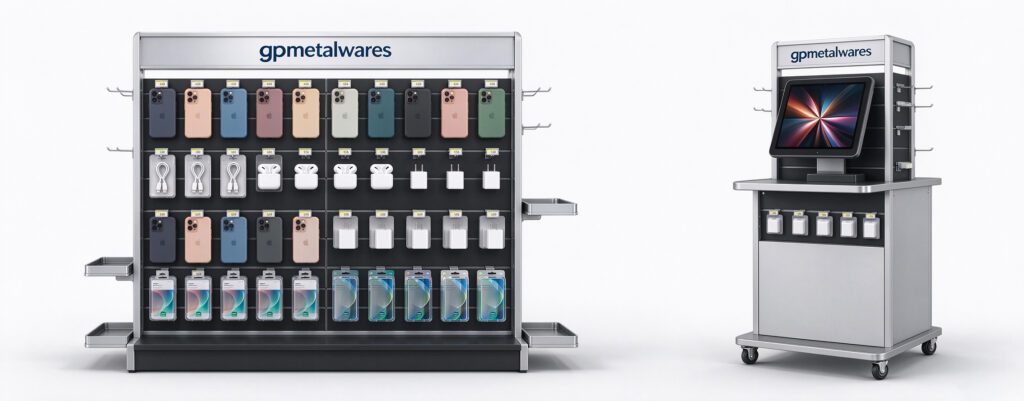
Phone accessory tier POS displays help mobile kiosks push small add-on sales. These compact stands sit right beside phone demo units. They turn casual shoppers into buyers of cases, cables and screen protectors. A poorly built rack wastes valuable counter space. A well-designed tiered display boosts impulse purchases and keeps products neat. This guide covers key design points for mobile retail kiosk POS tier displays. Verified Factory Showroom (Made-in-China):https://www.made-in-china.com/showroom/gpmetalwares
Match Dimensions to Kiosk Limited Counter Space
Mobile retail kiosks always have tight countertop real estate. Your tiered display cannot take too much room from phone demo zones. First, measure the usable width and depth of the kiosk counter. Most kiosk POS displays keep depth under 250mm to avoid blocking customer reach. Tier heights should step gently so every product stays visible. Tall back tiers hold bulkier items like power banks. Front shallow tiers fit slim goods such as phone cases and earbuds. You also need to leave space for price tags on each shelf edge. Avoid over-sizing the structure, or staff will remove it to free up counter room.
Choose Durable Materials for High Foot Traffic Kiosks
Kiosks face constant touching and occasional bumps from shoppers. Material choice directly impacts long-term display performance. Powder coated metal is the top pick for the main frame. It resists scratches and holds heavy stacked accessories without bending. Acrylic works great for front tier lips and clear product holders. It lets customers view items without opening packaging. MDF or plywood can be used for custom printed back panels. But seal all wood surfaces to stop damage from spills. Combine metal and acrylic for a clean, modern look that fits electronics retail. Avoid thin plastic; it cracks quickly under daily kiosk use.
Build Tier Layout to Guide Customer Sightline
Tier arrangement controls what shoppers notice first when they approach the kiosk. Place low-value impulse items on the front lowest tier. These include screen protectors and short charging cables. Put higher margin products like wireless chargers on middle tiers. Reserve the top back tier for premium bundles or branded earphone sets. Keep tier angle gentle so items do not slide forward. Add small raised stops on each shelf to prevent packaged goods slipping off. Make sure product labels sit at eye level for standing customers. This simple sightline strategy lifts add-on conversion at mobile kiosks.
Integrate Branding and Clear Product Labelling
Mobile accessory sales rely heavily on fast brand recognition. The tier display should carry your retail brand identity without cluttering shelves. Print branded graphics on the back panel of the rack. Use neutral base colours so packaged accessories remain the focal point. Leave dedicated slots for small paper or vinyl price tags. Each tier needs individual pricing, not one single sign for all goods. QR codes can also be added beside products for extra specs. Keep branding minimal and sharp; busy graphics distract buyers from the accessories themselves. Clean labelling saves staff time answering repeated product questions.
Add Practical Functional Details for Daily Kiosk Use
Small built-in features make the tier display far easier for retail teams to manage. Make shelves easy to wipe clean, as kiosks gather dust fast. Design removable tier trays for quick restocking during busy hours. Add small hooks on side frames for hanging cables and lanyards. Keep the whole unit lightweight enough for staff to reposition when needed. Include anti-slip rubber feet at the base. These feet stop scratching the kiosk counter and prevent sliding. Leave optional space for small LED strip lights if the kiosk area is dim. These small functional tweaks reduce daily maintenance work for retail staff.
Consider Security Features for High-Theft Small Accessories
Phone accessories are small and easy for shoppers to pocket. Security is a core design factor for kiosk tier displays. Clear acrylic guards can cover high-value earbud and charger tiers. Keep low-cost items open for touch and inspection. Design shelf edges to stop products being quickly swept off. You may also add simple lockable compartments at the back for stock storage. Avoid fully sealed displays, as customers like to see packaging closely. Balance open access and loss prevention carefully. Too much security will make customers feel restricted and reduce impulse buys.
Custom Options for Different Product Mixes
Not all mobile kiosks stock the same range of phone accessories. Your tier display design should support flexible product mixes. Use adjustable shelves to change tier spacing for different package heights. Swap out inserts to fit carded cables or boxed power banks. You can also add removable pegboard sections for hanging accessories. If the kiosk rotates seasonal promotions, build quick-change graphic panels. Standard base frames cut manufacturing cost, while custom inserts match your product lineup. This hybrid design gives retailers flexibility without full rework each season.
Test Load Capacity and Stability Before Mass Production
Many custom displays fail after mass rollout due to weak load bearing. Always run sample load testing before large orders. Stack full product weight on every tier to check bending or wobble. Test the unit with the same packaged accessories the kiosk will sell. Check joints and weld points for stress after long load tests. Verify rubber feet keep the unit stable when customers touch products. If the rack shakes easily, reinforce the metal frame. Skipping sample testing leads to costly replacements once deployed in kiosks. Solid stability keeps the display safe and professional looking.
Final Tips for Deployment at Mobile Retail Kiosks
Once your tier POS display is manufactured, plan simple on-site setup. Keep assembly fast; kiosk staff rarely have time for complicated builds. Provide clear packing so units arrive undamaged to retail locations. Train staff to restock front tiers first, to maintain full visual appeal. Review sales data after deployment to adjust tier product placement. Move top-selling accessories to the most visible shelf positions over time. A well-designed tier POS display does not only hold goods. It actively guides shoppers and grows accessory revenue for mobile retail kiosks.
中国制造网认证工厂展厅链接https://www.made-in-china.com/showroom/gpmetalwares